This project represents student work; no association with the National Science Teaching Association (NSTA).
I documented the desired features, functionality, and user experience of the search function and content library of the National Science Teaching Association (NSTA).
The goal of this product is to enable NSTA’s 40,000 members and other science educators to access the large collection of lesson plans, journal articles, professional learning units, seminars, e-books, and more that the organization provides online and for mail order.
I developed 5 user personas (3 external / 2 internal), focusing on behaviors over demographic backgrounds.
Next, I wrote an exhaustive set of user stories – short descriptions of a feature, told from the perspective of the user.
S.1 – As an External User, I want to be able to type in search terms and see robust, relevant results in response so that I can quickly find lesson plans.
S.2 – As an External User, I want to be able to quickly find lesson plans so that I can prepare for my classes when I’m in a time crunch.
S.3 – As an External User, I want to be able to see alignment with state and national (NGSS) standards at-a-glance so that I can decide what is relevant quickly and not waste my time browsing.
S.4 – As an External User, I want to be able to filter search results by grade level, topic, and resource type so that I can find resources that are relevant to my specific needs and appropriate for my students.
S.5 – As an External User, I want to be able to filter search results by included multimedia, such as videos or interactive simulations, so that I can find engaging and varied resources to supplement my existing curricula.
S.6 – As an External User, I want the content library to have a tutorial or guide so that I can learn how to use the library effectively and understand the differences between resource types.
S.7 – As an External User, I want a consistent format for content listings and search formats so that I can quickly process information.
S.8 – As an External User, I want to be able to differentiate between different content types so that I do not click on a case study expecting a lesson plan.
S.9 – As an External User, I want to be able to browse curated collections of resources in the content library so that I can easily find high-quality materials to use in my classroom.
S.10 – As an External User, I want to be able to search for and easily identify free resources in the library so that I can find materials that fit within my school’s budget.
S.11 – As an External User, I want to be able to access resources in the content library that feature diverse perspectives and contributions in the sciences so that students can make connections to their own experiences as well as see themselves represented.
S.12 – As an External User, I want to be able to access the library from any device, so that I can search for content on-the-go or at home.
S.13 – As an External User, I want to be able to save my favorite content to my account, so that I can easily access it as needed without having to search again.
S.14 – As an External User, I want to be able to tag and sort saved content using custom tags, so I can organize resources in a way that is meaningful to me.
S.15 – As an External User, want to be able to save customized searches, so that I can quickly run searches for content that I need frequently without having to set up the same filters and parameters every time.
S.16 – As an External User, I want to be able to leave comments and ratings on content, so that I can share my feedback and help others make informed decisions.
S.17 – As an External User, I want to be able to see comments, ratings and reviews so that I can understand how other teachers and students have used and reviewed the resources and use that to inform my choice.
S.18 – As an External User, I want to be able to sort search results by criteria of my choosing, such as publication date or rating, so that I can see the most recent or highest rated materials to ensure my students are receiving up-to-date and quality instruction.
S.19 – As an External User, I want to be able to share resources from the content library with other teachers so that we can collaborate and share ideas.
S.20 – As an External User, I want to be able to make sure I can access resources offline so that if there are any connectivity issues at my school, I will still be able to teach my students.
S.21 – As an External User, I want to be able to see a news or updates section so that I can stay informed on new developments in the field.
S.22 – As an External User, I want to be able to see suggestions of related resources once I am looking at a content item so that I can discover new materials I may not have considered.
S.23 – As an External User, I want to be able to annotate resources saved to my personal library, so that I can debrief after using a resource and save modifications for next use.
S.24 – As an Internal User, I want to be able to upload new content so that I can keep a steady flow of up-to-date resources available for NSTA members.
S.25 – As an Internal User, I want to be able to update the metadata of uploaded content to reflect its characteristics and make it easily indexable and searchable, so that external users can find what they need.
S.26 – As an Internal User, I want to be able to see the number of times content has appeared in search results, been viewed, downloaded, saved, and shared so that I can track its popularity/impact and determine future content strategy.
S.27 – As an Internal User, I want to be able to generate reports on content usage and engagement, so that I can track the library’s performance and report on the impact of NSTA resources to key stakeholders.
S.28 – As an Internal User, I want to be able to identify the lowest and highest rated content, so that I can understand user preferences and supply more content in line with these preferences.
S.29 – As an Internal User, I want to be able to track user behavior, such as search queries and content views, so that I can understand user needs and better define user personas.
S.30 – As an Internal User, I want to be able to see user reviews of content before they are publicly posted so that I can moderate for inappropriate content.
S.31 – As an Internal User, I want to be able to see user reviews of content before they are publicly posted so that I can be aware of any concerns users have with NSTA content and address these concerns as quickly as possible.
S.32 – As an Internal User, I want to be able to see what content is rapidly becoming popular over the time span of a few days or weeks so that I can stay abreast of “trending” content and join the conversation via social media or blog posts.
S.33 – As an Internal User, I want to be able to seamlessly update existing content to newer versions, so that I can issue any necessary corrections without disrupting the external user experience.
S.34 – As an Internal User, I want to be able to archive and retire content without creating dead links so that I can prevent junking up internal and external search results and negatively impacting brand perception.
S.35 – As an Internal User, I want to be able to see common search queries that are returning low numbers of results or no results, so that I can identify gaps in content and supply more content in line with user needs.
S.36 – As an Internal User, I want to be able to group resources into curated collections so that I can provide comprehensive sets of complementary resources for external users.
S.37 – As an Internal User, I want to be able to feature certain content, so that I can draw user attention to content co-created with partners and support diverse revenue streams.
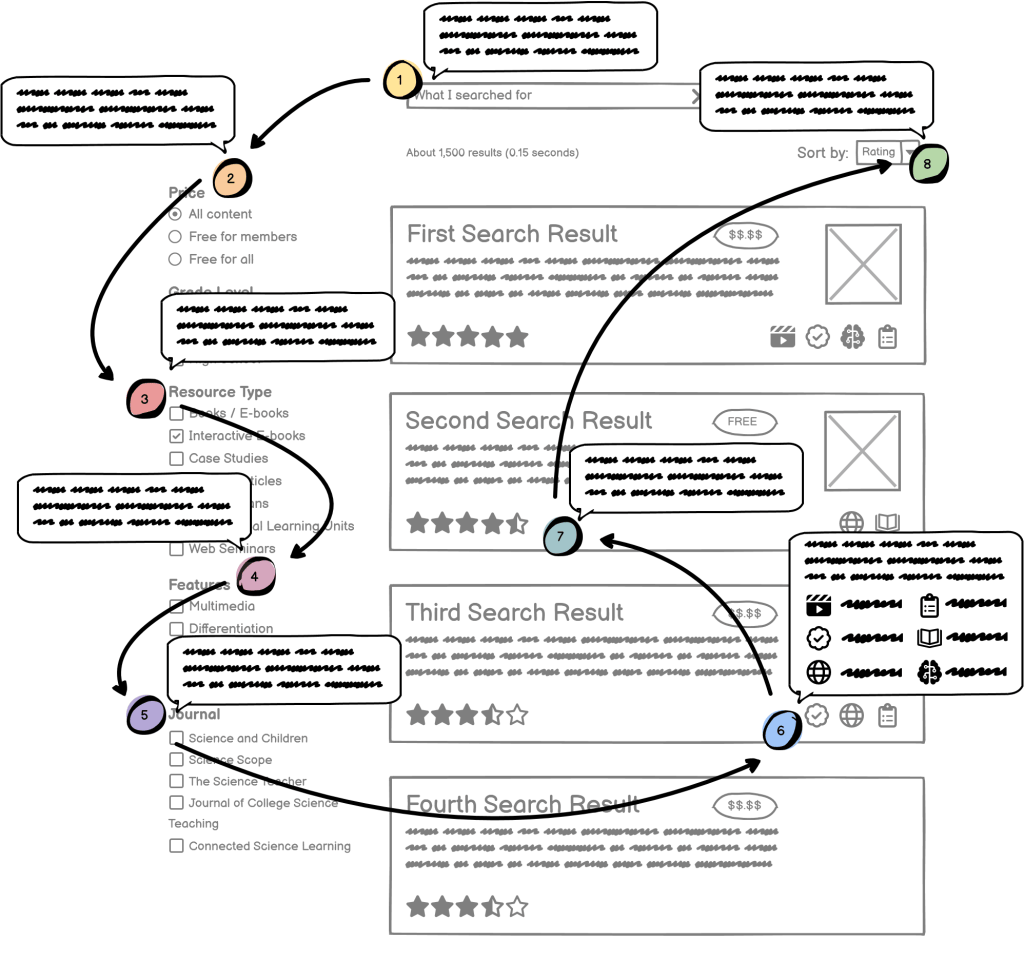
Based on the user stories, I outlined lists of features and created wireframes to illustrate the overall layouts and placement of key elements:



Leave a Reply